
May 27, 2026

VR vs Triple Screens is the biggest setup decision in sim racing for 2026 — here’s exactly where each one wins. Triple-screen wins for competitive sim racing in 2026. VR wins for immersion, rally driving, and cockpit aviation. At SIMPRO Academy Phuket we race on three 32-inch curved monitors paired with a Simucube 2 Pro direct-drive wheelbase and Simtrecs load-cell pedals — and that combination is what we recommend to every student who’s serious about lap time.
This guide explains, with hardware names and 2026 prices, where each setup beats the other. We’ll cover what the top sim racing professionals actually use, what the input-lag and field-of-view trade-offs really look like, when VR is the smarter choice (rally, single-seaters, motion-sickness exceptions aside), and what a 90-minute session on our triple-screen rig actually feels like. If you’re trying to decide between buying a headset or building a screen stack at home, this is the post.
Try the setup before you buy it. A 60-minute session at SIMPRO costs 1,300 THB (including 7% VAT and 3% booking fee). Call +66 62 962 2822 or email info@simproacademyphuket.com to lock in a slot.
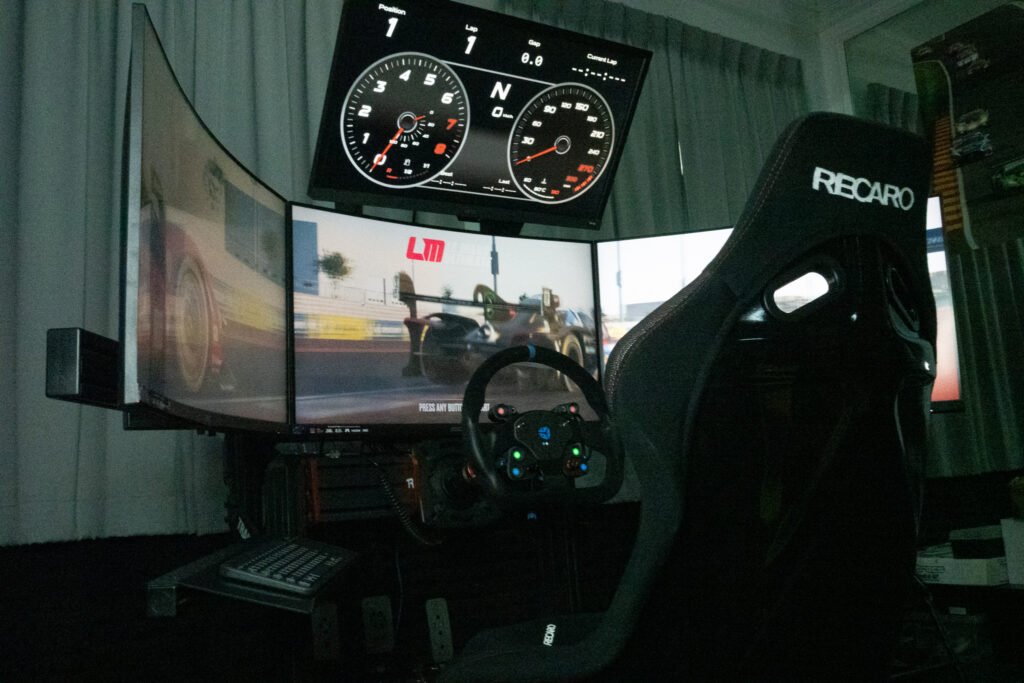
Table of Contents
ToggleBefore we compare anything, here’s the reference point. The triple-screen rig at SIMPRO in Boat Lagoon is the rig you’ll find when you walk through the door.
There’s no ‘tablet on a stand’ compromise in this rig. The wheel, the pedals, and the screens are the same hardware category that pros race on at home. The only thing you’re missing at SIMPRO that the pros have is the practice volume — and that’s what coaching is for.
If you’re shopping for a VR headset for sim racing in 2026, three options are worth considering. Everything else is either older hardware that’s been outclassed (original Quest 2, Reverb G2) or so expensive it stops making sense for a private rig.
| Headset | Resolution / eye | Refresh / FOV | Approx. 2026 USD | Best for |
|---|---|---|---|---|
| Meta Quest 3S | 1832 × 1920 | 120 Hz · 110° H | $299 | Best value · stand-alone use |
| Pimax Crystal Light | 2880 × 2880 | 120 Hz · 130° H | $799 | Best image clarity for sim |
| Valve Index 2 (2026) | 2160 × 2160 | 144 Hz · 130° H | $999 | Lowest motion-to-photon latency |
All three are good headsets. None of them, today, beats a calibrated triple-monitor setup for chasing lap time. That isn’t a marketing position — it’s what the input-lag, refresh, and pixel-density numbers say once you run them against a 144 Hz triple-screen.
In the VR vs Triple Screens debate, VR genuinely wins in four situations.
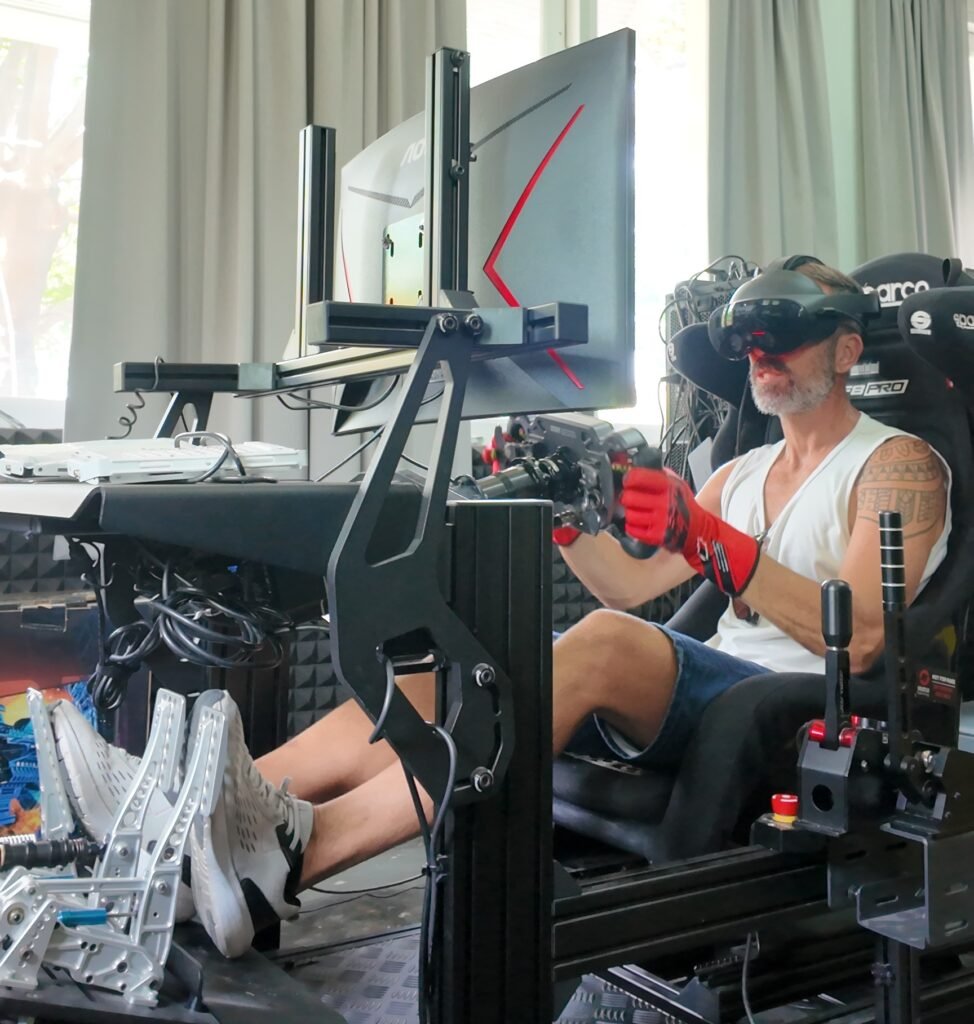
Rally is the strongest case for VR in 2026. EA Sports WRC, Richard Burns Rally with the RSF mod set, and Dirt Rally 2.0 all reward looking through the corner ahead of the car — and VR lets you do that naturally. On a triple-screen you have to assign a ‘look into corner’ button. In VR you just turn your head.
In an open-cockpit car the cockpit itself is the experience. VR makes you small in the car. A triple-screen makes the car small around you. For Formula and prototype racing, that immersion is worth something — especially for casual lapping.
VR is unambiguously the right call for cockpit aviation — IFR practice, helicopter, air-combat sims. The natural head-down scan to instruments and head-up scan to traffic is impossible to replicate on a flat monitor stack. For procedural training where coach interaction matters, triple-screen still wins. See our PPL/CPL Procedural Training post.
If you live in an apartment, a Quest 3S is a 350-gram headset. Three 32-inch monitors are a 1.5-metre wall of glass. The hardware constraint is real.
The VR vs Triple Screens comparison swings the other way once you chase lap time.
On a triple-screen rig running 144 Hz monitors, motion-to-photon latency is typically 8–12 ms. Current consumer VR is in the 25–40 ms range once you account for the headset display, re-projection, and warp. For competitive racing — where you brake on a specific reference point at 230 km/h — that delta matters. Twelve milliseconds at 230 km/h is roughly 75 centimetres of brake-point uncertainty.
In wheel-to-wheel racing your peripheral vision is doing real work — tracking the car alongside, the corner exit kerb, the apex paint, the dash. Triple-screen 150 degree wrap puts that in your real peripheral field. Most VR headsets are 100 to 130 degrees and the edges aren’t fovea-sharp. You’ll feel it most when defending a position.
Braking points are usually 100 to 200 metres ahead. The ‘tree at the 100-metre board’ that you reference for brake timing is, in VR, a few pixels of indistinct foliage. On a 32-inch 1440p monitor a metre from your face, those pixels are visible. Pros call this ‘where the metre signs live’ — and it’s why so many of them race on the highest pixel density they can afford.
A 90-minute coaching session in VR is doable. A 3-hour iRacing endurance race in VR is brutal for most people. Triple-screen has no headset weight, no facial fatigue, no battery anxiety. If you race long, you race triple-screen.
This one is specific to coached sessions but it’s why every coaching-focused venue uses triple-screen. Paul cannot tap your shoulder, point at your brake trace on the laptop, or hand you a printed reference diagram if you’re wearing a VR headset. Triple-screen keeps the room open.
We pulled the publicly available setup details from the most-watched sim racers and esports-tier drivers. The pattern is consistent.
We pulled the publicly available setup details from the most-watched sim racers and esports-tier drivers. The pattern is consistent.
| Driver | Series | Display setup | Wheelbase class |
|---|---|---|---|
| Jarl Arne Bamber | Le Mans Virtual / iRacing | Triple 32" curved | Direct drive (high torque) |
| James Baldwin | ACC / GT World Challenge sim | Triple 49" ultrawide stack | Direct drive |
| Max Verstappen (home rig) | iRacing / Le Mans Ultimate | Triple monitor (reportedly) | Direct drive |
| Porsche Esports Supercup grid | iRacing Porsche TAG Heuer Esports Supercup | Predominantly triple-screen | Direct drive |
The Porsche Esports Supercup data is especially telling. It’s an Asia-Pacific-and-global series with strict equipment regulation. The vast majority of qualifying drivers race on triple-screen direct-drive rigs — because the marginal lap-time gain on a precise reference point is what separates a top-20 finish from a top-5.
This is the VR vs Triple Screens choice in its shortest form. If you’re choosing between buying a Quest 3S and building a triple-screen setup, this is the short version.
| Choose VR if … | Choose triple-screen if … |
|---|---|
| You race for immersion — rally, open-cockpit single-seaters, hill-climb. | You chase lap times — GT3, Formula, LMP, endurance. |
| You like cockpit-style aviation — IFR practice and air-combat sims. | You want clean wheel-to-wheel awareness with no headset weight. |
| You have space at home but not budget for triple monitors. | You race for more than 60–90 minutes at a time. |
| You wear contact lenses or have prescription inserts. | You wear glasses and don't want a headset over them. |
| You can tolerate VR sickness — and you've tested for it. | You're prone to motion sickness, especially during braking. |
There’s no shame in choosing VR. Plenty of brilliant sim racers do. We’re describing what the data says about where each setup gives the most return — and at a coaching venue trying to lower your lap time, that’s the triple-screen rig.
This surprises people. Beginners often assume VR will be easier because it’s ‘more immersive.’ In our coaching experience, the opposite is true.
Once a student has the basics — brake point, turn-in, apex, exit — and they want to try VR for fun, we’re happy to swap. But for lap-time progress, the triple-screen rig is the right starting point.
Anyone who tells you VR motion sickness is solved hasn’t seen a beginner take their first lap of Spa in a Quest 3S. It’s still a real phenomenon, it still affects a meaningful percentage of users, and it’s worth understanding before you spend money on a headset.
The underlying cause is visual-vestibular mismatch. Your inner ear knows you aren’t moving. Your eyes are receiving very convincing data that you are. The brain reconciles the conflict with nausea — same mechanism as seasickness, same mechanism as reading in a moving car.
Some users adapt within 5 to 10 sessions. Some never adapt. There’s no reliable way to predict which group you’re in without trying. If you’re considering a VR purchase, test someone else’s headset for at least 30 minutes of actual racing before you commit. At SIMPRO we don’t currently offer VR demos — but we’ll tell you honestly whether the triple-screen experience is solving the question you actually have.
Here’s the VR vs Triple Screens cost reality for a home build. If you’re not booking SIMPRO and you’re building a home rig, here’s the realistic 2026 cost breakdown.
Across most builds the price difference is smaller than people expect once you’re matching the same PC. The bigger constraint is usually space and partner tolerance.
Triple-screen is faster for lap times in 2026. Lower input latency, better peripheral awareness, sharper distant reference points, and longer comfortable session length all add up. The competitive sim racing world overwhelmingly races on triple-screen direct-drive rigs — including most of the Porsche Esports Supercup grid and the Le Mans Virtual Series teams.
Our three 32-inch curved monitors wrap to roughly 150 degrees of horizontal field of view at typical sitting distance. That covers the cone where most of your brake-and-corner decisions happen and matches the perceptual cues you’d have in a real race car. We calibrate the in-game FOV to match the physical geometry — so a corner that looks ‘two car lengths away’ actually is two car lengths away.
Our default rig is triple-screen because that’s what our coaches recommend for lap-time progress and beginner accessibility. We may add a dedicated VR station for specific use cases like rally coaching and flight sim work — ask when you book, because availability changes. For most sessions, the triple-screen rig is the answer.
Roughly 1 in 3 first-time VR users feel some level of motion discomfort in sim racing. Some adapt within 5 to 10 sessions. Some never adapt fully. The mechanism is visual-vestibular mismatch — your eyes report motion your inner ear doesn’t confirm. If you’re shopping for VR, test someone else’s headset for at least 30 minutes of actual racing, not a short demo, before you commit.
32 inches is the sweet spot for a curved triple-screen sim setup. 27-inch panels start to feel narrow with bezels, 49-inch ultrawides are too wide to triple-stack without absurd cockpit length, and 32-inch curved 1440p hits the right balance of pixel density at distance and total wrap area. It is also the pixel-per-degree number that maps cleanly onto how human peripheral resolution falls off.
Per-pixel, triple-screen at 1440p x 3 is similar in load to a high-resolution VR headset like the Pimax Crystal Light. A modern RTX 4070 Super or equivalent handles either comfortably for sim racing. The bigger PC budget belongs to your CPU and memory if you race iRacing with a full grid — both setups stress the same parts of the system.
Generally no. Our rig is configured around the triple-screen path so we can calibrate FOV, input latency, and coaching workflow consistently for every session. Bring your headset by all means and we’ll have a look — but the session will run on our display setup.
A standard session at SIMPRO is 60 minutes for 1,300 THB (including 7% VAT and 3% booking fee). It runs as approximately 10 minutes of seat-fit and intro, 40 to 50 minutes of driving with live coaching, and 10 to 15 minutes of debrief over telemetry. First-timers usually leave with a 3 to 5 second lap-time gain over their first lap.
For most first-time students we start in Assetto Corsa Competizione with a GT3 car at an easier circuit — typically Monza, Brands Hatch, or Spa. The handling model is forgiving enough to learn on but realistic enough to transfer skills. We choose the title and car based on what you tell us in the pre-session form.
Call +66 62 962 2822 or email info@simproacademyphuket.com. Sessions are 1,300 THB per 60 minutes (including 7% VAT and 3% booking fee). Group rates and multi-session packages are available — ask about the 10-session comprehensive program if you’re working on a specific track or licence target.
Paul Chappell is Founder and Operator of SIMPRO Academy Phuket. With 23+ years as a professional airline pilot for world-leading airlines and private jet companies, Paul brings deep expertise in precision performance and simulator-based training. He held the position of Lead Captain on a Boeing Business Jet, where he managed flight training and checking responsibilities. He is a Qualified Flight Instructor with thousands of hours of professional simulator experience in certified full-motion flight simulators.
Beyond aviation, Paul is a lifelong motorsport enthusiast. He has ridden high-performance motorbikes for 10+ years, completed multiple track days in an AMG 45S, finished a professional rally driver training course, and logged extensive recreational go-kart racing. In 2015 he relocated to Phuket to pursue tourism entrepreneurship, eventually founding SIMPRO Academy in 2024 to bring professional racing and flight simulation training to Southeast Asia.
Leave a Comment: